
Are my secrets safe?
What this page is for: checking where your keys and environment variables live, and whether a secret ends up in the browser, in git, or written in the code.
AI tools often put a secret key where it should not be — for example with a NEXT_PUBLIC_ or VITE_ prefix, which makes it part of the page that every visitor downloads.
Steps
- Open Structure (how).
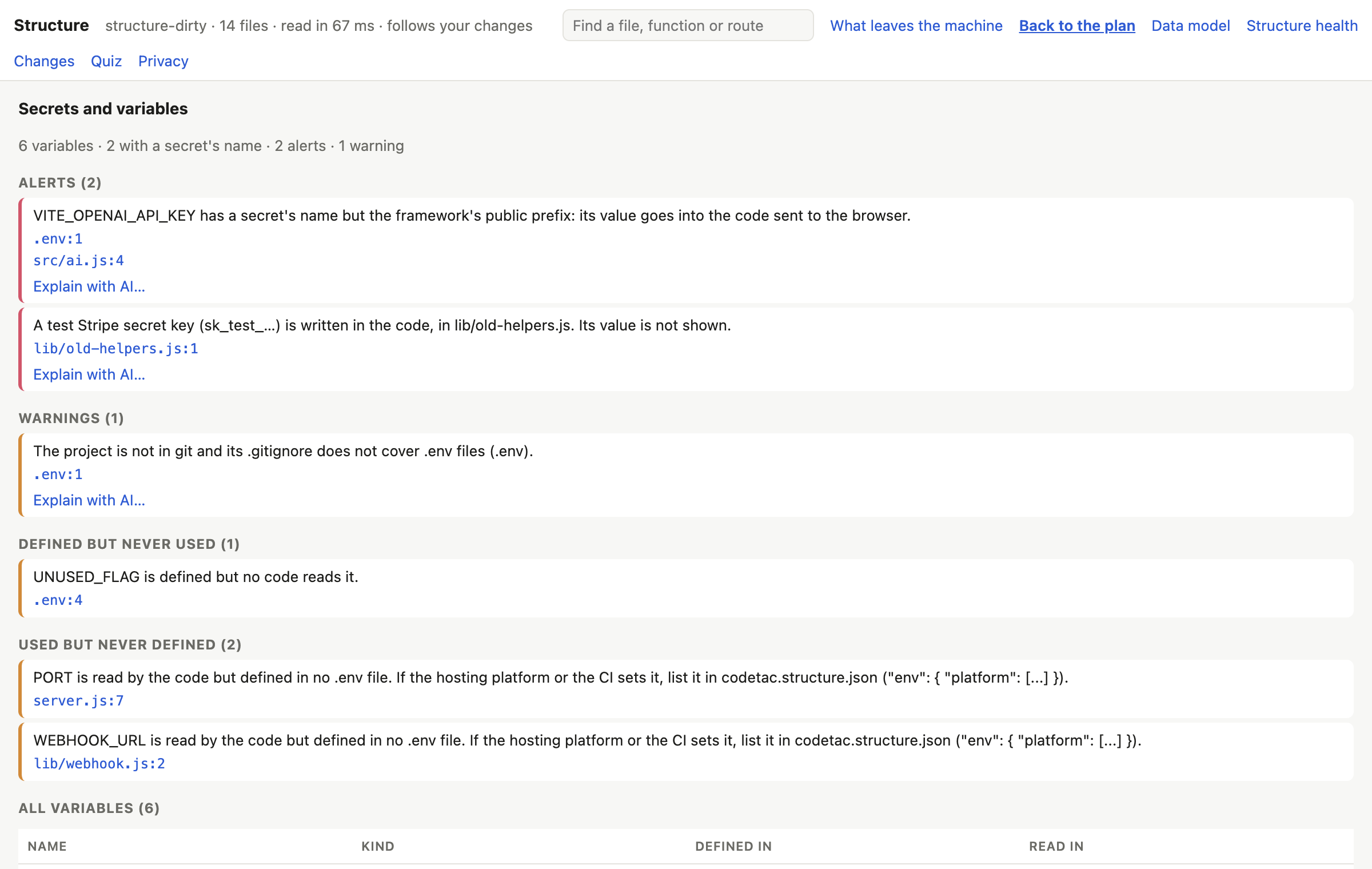
- Press Secrets and variables at the top of the plan.
- Read the Alerts first, then the Warnings.
- Click an alert to see the file and line.
- Fix it (or ask your AI tool to fix it), save, and watch the alert go away — the plan follows your changes.
What each finding means
Alerts — fix these
| Alert | Why it matters |
|---|---|
A secret with a public prefix (NEXT_PUBLIC_, VITE_…) | the framework copies its value into the browser code: anyone can read it |
A .env file followed by git | the secret goes to GitHub with your code |
| A key written in the code | shown only by its kind and public start, such as sk_test_… |
Warnings — look at these
| Warning | Why it matters |
|---|---|
| A secret read in browser code, without the prefix | it will probably be empty in the browser — or someone will “fix” it by adding the prefix |
A .env file that no .gitignore rule covers | one git add . away from being published |
Two more lists
- Defined but never used: a variable in a
.envfile that no code reads. - Used but never defined: a variable the code reads but that no
.envfile defines. If it is set somewhere else (your hosting platform, CI), list it in the settings file underenv.platformso it stops appearing here.
Keys made to be public
Some keys are meant to be in the browser: the Supabase anon key, Stripe publishable keys. These never raise an alert. A Supabase service_role key always does.
Your secret values are never shown
codeTAC shows names, files and lines only. No value of a variable or key is shown on these pages, stored by codeTAC, or sent to an AI. Keys written in the code are masked in every code excerpt (sk_test_••••••). Of your .env files, codeTAC keeps only a fingerprint (a hash), never their contents. An automatic test searches everything codeTAC produces for the secret values of its test projects and must find none.
What it means
An alert is almost always a real problem to fix before you publish your app. A warning is worth a look. The lists of unused and undefined variables help you keep your .env tidy.
What it can't tell you
- Indirect reads are not seen:
const env = process.env; env.X,process.env[name], libraries such as@t3-oss/envorzodschemas. - Keys written in the code are recognised only by known shapes (Stripe, OpenAI, Anthropic, AWS, GitHub, Slack, Google, SendGrid, private keys, Supabase
service_role). Other keys can slip by. - In a monorepo, variables with the same name in different packages are treated as one.
- Vite's
envPrefixis read only when it is written literally invite.config. - A key that was already pushed to GitHub stays in its history even after you remove it: change the key at the service.