Install and first dossier
What this page is for: getting codeTAC running on your app and seeing your first dossier — the record of one action — in about five minutes.
What you need
- Node.js 24 or newer. Open the Terminal and type
node -v. It must showv24or a higher number. If it does not, install the LTS version from nodejs.org. You need Node even if your app is in Python: codeTAC itself is installed with npm. To only check whether your app is safe to ship (codetac check), Node 20 is enough. - Your app's project on your computer. If your app lives in Lovable, Bolt, v0 or Replit, connect it to GitHub first, then download it:
- on GitHub, press Code → Download ZIP and unzip the file;
- or, if you use Git,
git clone <address>.
- A browser: Chrome, Edge, Firefox or Safari.
- Only for Python apps: Python 3.12 or newer. Type
python3 --versionto check. If you do not have it, install it from python.org (on a Mac,brew install pythonalso works). If you use uv, codeTAC uses it too, and uv downloads any Python that is missing. See Python apps.
How to open the Terminal
- Mac: press Cmd+Space, type “Terminal”, press Enter.
- Windows: Start menu, type “PowerShell”, press Enter. On Windows,
codetac checkand the floor plan work; starting your app with codeTAC does not work yet.
Which apps work
| Works (tested) | Should work (not tested yet) | Does not work yet |
|---|---|---|
| Next.js, Vite + React, Express, TanStack Start, projects with a separate frontend and backend, monorepos | Nuxt, SvelteKit, Astro, Remix, NestJS, Fastify… | Django, PHP, Go, Ruby (Laravel, Rails…) |
| FastAPI and Flask (Python) | Sites with only HTML and JavaScript, with no Node or Python server | |
| A Node frontend with a Python API in the same folder | Parts that run on Bun, Deno, Cloudflare Workers or in Next.js middleware | |
| Apps that only exist in the cloud or in production |
Step 1 — Install
In the Terminal, type:
npm install -g codetacCheck that it worked:
codetac --versionIt shows a version number.
If you see a permissions error (EACCES)
Use npx codetac instead of codetac in every step below. It works without installing.
Step 2 — Go to your project's folder
Type cd (with a space after it), drag your project's folder into the Terminal window, and press Enter.
Step 3 — Start your app with codeTAC
codetaccodeTAC tells you what it is going to start, for example:
Start: Vite · npm run devIt may ask you a question first. Pressing Enter means yes.
- Dependencies missing? It asks whether to install them.
- A Python app with no environment? It asks whether to create a
.venvin the project folder and install what the project lists (requirements.txt,pyproject.tomloruv.lock). - A
.env.examplebut no.env? It warns you. Many apps need that file: copy.env.exampleto.envand fill in the values. - Several parts (for example a frontend and an API)? It asks which ones to start. Enter starts them all.
Step 4 — Wait for “App ready”
When you see
✓ App ready at http://localhost:…the browser opens with your app.
- A FastAPI API opens its interactive documentation (
/docs). Each Try it out gets a dossier. - A Node API with no pages does not open the browser. Send requests as you usually do; each one gets a dossier. The link to the panel is shown in the Terminal.
Step 5 — Use your app
Click a button, follow a link, submit a form.
- A small bar saying Recorded: … appears in the bottom right corner of the page.
- The Terminal shows ✓ First dossier … with a link.
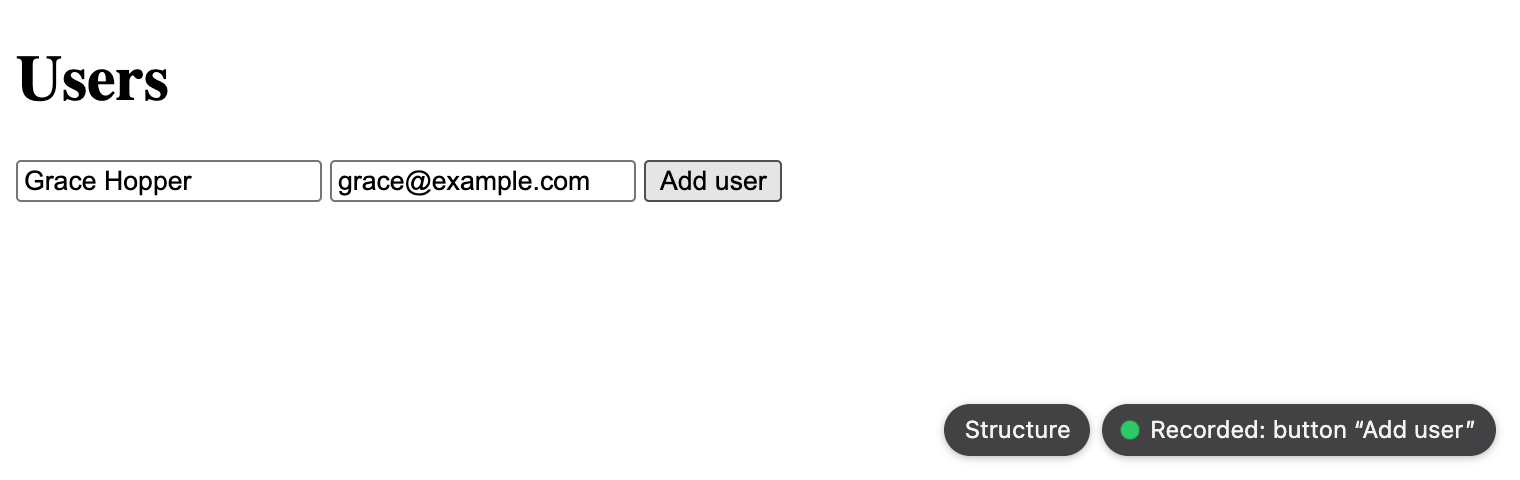
The dot on the CodeTAC button says whether your actions are being recorded:
| Dot | Meaning |
|---|---|
| green | codeTAC is recording: use your app |
| green, pulsing (Recording…) | an action is being recorded right now |
| green (Recorded: …) | the last action was recorded; it stays when the page reloads |
| amber | the actions are recorded, but the panel does not answer, so the dossier cannot open: start codetac again |
| red (Not recording) | the app's server did not take the last action: is codetac still running in the terminal? |
Step 6 — Open the dossier
Click the bar, or open the link from the Terminal. You now see what your click did. How to read it.
Step 7 — Stop
Go back to the Terminal and press Ctrl+C. Your app stops, and nothing in it has changed.
What it means
For an app codeTAC already knows how to start, the first dossier usually arrives in less than a minute. From then on, every action you make in your app gets its own dossier, and they are all kept on your computer (in a folder called ~/.codetac).
What it can't tell you
- If your app does not start without codeTAC either (missing keys in
.env, a database that is not running), codeTAC cannot fix that. It shows the app's own error, with the file and line. See When something goes wrong. - codeTAC is for your app on your computer, while you develop it. It does not watch apps in production.
Next
- Using Claude Code? In your project's folder, run
codetac hooks installonce. From then on, after each prompt, the bar shows What changed?, a report of what that prompt did to your project: What did my last prompt change? - What is your project made of? Press Structure on the bar: the floor plan.