My database tables
What this page is for: seeing your project's tables, their columns and links, and which code reads and writes each one — including code running in the browser.
Steps
- Open Structure (how).
- Press Data model at the top of the plan.
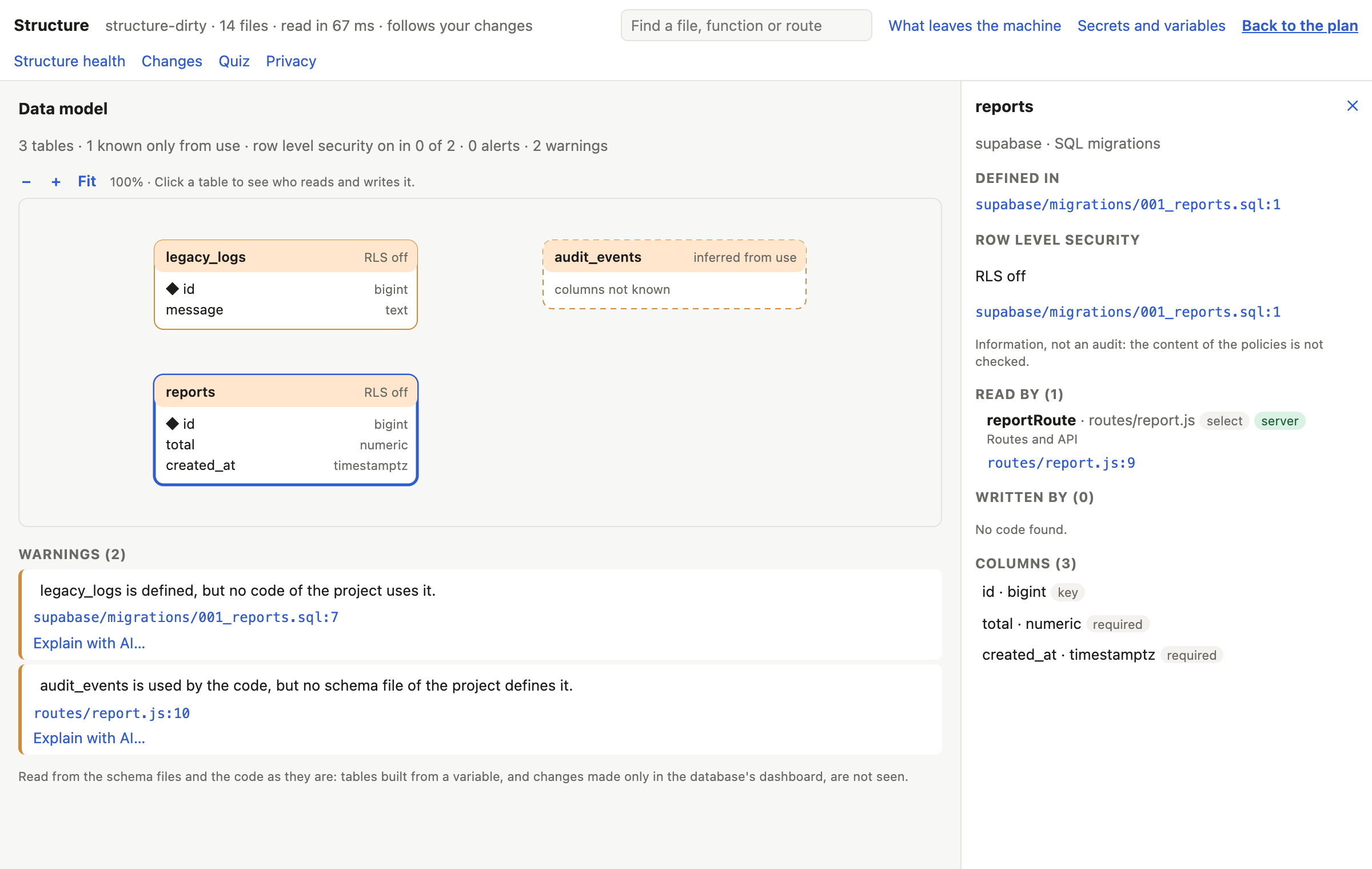
- Look at the diagram: each box is a table. Use +, − and Fit to zoom.
- Click a table to open its card.
- Read the alerts and warnings listed with the diagram.
In the Terminal, codetac structure also lists the tables.
Where the tables come from
codeTAC reads your project's schema, in this order:
- Node: Prisma, Drizzle, SQL migrations, or the types Supabase generates.
- Python: SQLAlchemy models (SQLModel too), Alembic migrations, and
CREATE TABLEinsideexecute(…).
And from the code that uses them, for example supabase.from('orders'), SQL in query(…), prisma.order.findMany(), Drizzle's db.select().from(orders); in Python session.query(Order), select(Order), session.add(…).
What you see
The diagram
- ◆ marks a key column; → a column that points to another table.
- Lines join linked tables.
- A dashed table is known only from its use in the code (inferred from use): no schema file defines it, so its columns are not known.
The card of a table
- Read by and Written by: the function, file, block and line — in the browser or on the server — and the operation (
select,insert,update,upsert,delete). - Defined in: the schema file.
- Row level security: on or off, and how many policies, when the project's SQL files say so. This is information, not an audit: the content of the policies is not checked.
Alert
A table with row level security off, read or written directly by code that runs in the browser. Anyone with your project's public key can then read or change that table. This is common in Supabase apps made by AI tools, and it is serious: fix it before you publish.
Warnings
- A table used but not defined by any schema file.
- A table defined but never used by any code (only when the project has a schema).
What it means
If you ever wondered “which part of my app writes to orders?”, the card answers it, with the proof. The alert points to the most common data leak in AI-made apps.
What it can't tell you
- Not seen: tables whose name comes from a variable, SQL built in pieces,
rpc,$queryRaw, Knex, Kysely, TypeORM, Sequelize and Mongoose; migrations written in code. - In Python, not seen: tables made with
Table(…)(SQLAlchemy Core), Django's ORM, and a write done by setting an attribute and callingcommit(). - Row level security is read from the project's SQL files only — not from the Supabase dashboard or the live database. A change made only in the dashboard is not seen.