
Is my project getting messy?
What this page is for: spotting the organisation problems AI-written code tends to pile up — loops, dead files, copied code, shortcuts — before they make every new change harder.
Nothing here blocks anything. It is information to help you (and your AI tool) keep the project easy to change.
Steps
- Open Structure (how).
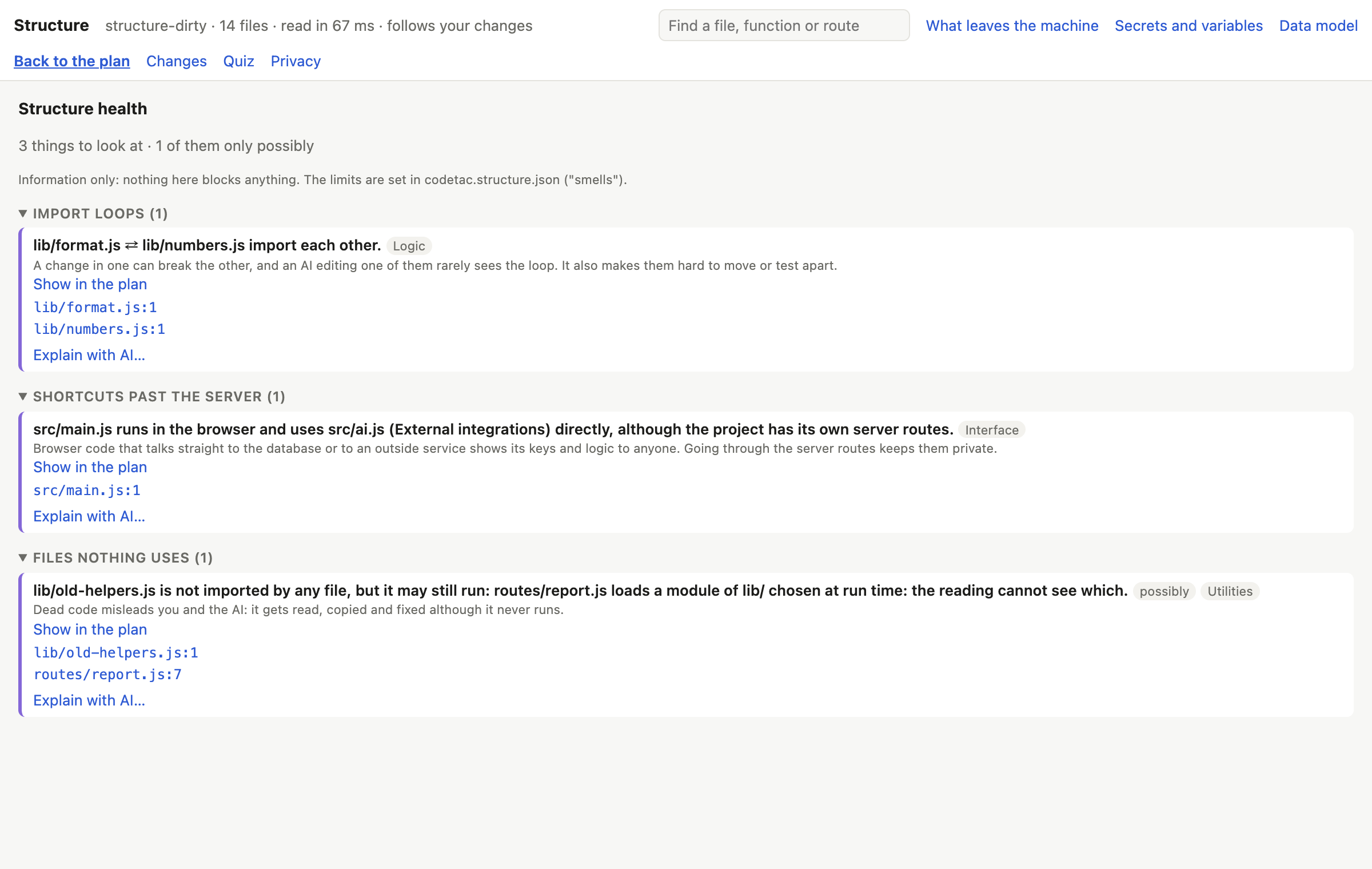
- Press Structure health at the top of the plan.
- Each problem says what it is and why it matters, with its proof.
- Press Show in the plan to see it on the floor plan.
In the Terminal, codetac structure ends with a summary of the structure's health.
What each problem means
| Problem | What it is | Why it matters |
|---|---|---|
| Import loops | files that import each other in a circle | a change in one can break the other, and an AI editing one rarely sees the loop |
| Shortcuts past the server | browser code that talks straight to the database or an outside service, although the project has its own server routes | it shows keys and logic to anyone; going through the server keeps them hidden |
| Too many links | a block or file that everything depends on, or that depends on everything | a change there can break the whole project; it probably mixes too many jobs |
| Copied code | the same code in several places | a fix made in one copy is easily missed in the others |
| Files nothing uses | files no file imports and no framework or script starts | dead code misleads you and the AI: it gets read, copied and fixed although it never runs |
| Large files | files over 400 lines (you can change the limit) | hard to review; an AI editing them tends to rewrite parts it was not asked to touch |
| Exports nothing imports | something a file offers that no file uses | probably left over from an earlier version |
“possibly”
Some files look unused but may still run — for example a file in a folder that frameworks load by themselves, or a file in public/ loaded by its address. codeTAC then says possibly, and why. Files that frameworks start by themselves (Next.js pages, layouts, routes, middleware, tests, config files, what package.json starts; in Python, the file that creates the app, __init__.py, __main__.py, wsgi.py/asgi.py, migrations…) are never called dead.
Changing the limits
In the settings file, under smells, you can change the limits (for example "largeFileLines": 600) or turn a kind off ("off": ["unused-export"]). See Settings file.
What it means
A few problems are normal in any project. What matters is the trend: if every AI change adds a new loop or a new copy, the project is getting harder to change. Use What did the AI change? to catch them as they appear.
A good way to use this page: copy a problem and its proof into your AI tool and ask it to fix that one thing.
What it can't tell you
- Unused functions inside a used file are not found.
require()andimport()count as using everything in a file.- Copied code counts only when the names are the same; copies with renamed variables are missed.
- Frameworks other than Next.js are known only by their usual folders and names — so their files may be marked possibly.