Privacy and AI
What this page is for: knowing what stays on your computer, what can go to an AI model, and how to switch AI off completely.
The short version
- Everything codeTAC records stays on your computer, in a folder called
~/.codetac. There is no account and no codeTAC server. - Before recording, secrets are removed: passwords, tokens, keys, emails and phone numbers.
- By default no values are recorded — only names, files and lines. Values are recorded only in the functions where you press request detail.
- The panel only answers on this computer (
127.0.0.1). - AI is optional. With no AI, everything still works; the sentences are built from the facts.
Which AI is used?
With no setup at all:
- if Ollama is running on your computer, codeTAC uses it — nothing leaves your machine;
- if it is not, no AI is used.
To use Anthropic or OpenAI, create the file ~/.codetac/ai.json:
{ "provider": "anthropic", "key": "your-key" }For OpenAI: { "provider": "openai", "model": "gpt-5.4-mini", "key": "…" }. For another OpenAI-compatible service: { "provider": "compatible", "url": "https://…", "model": "…", "key": "…" }.
To turn AI off, Ollama included: { "provider": "none" }.
Using variables instead of the file
CODETAC_AI_PROVIDER, CODETAC_AI_MODEL, CODETAC_AI_KEY and CODETAC_AI_URL take priority over the file. CODETAC_AI_CONFIG points to another file.
The Privacy screen
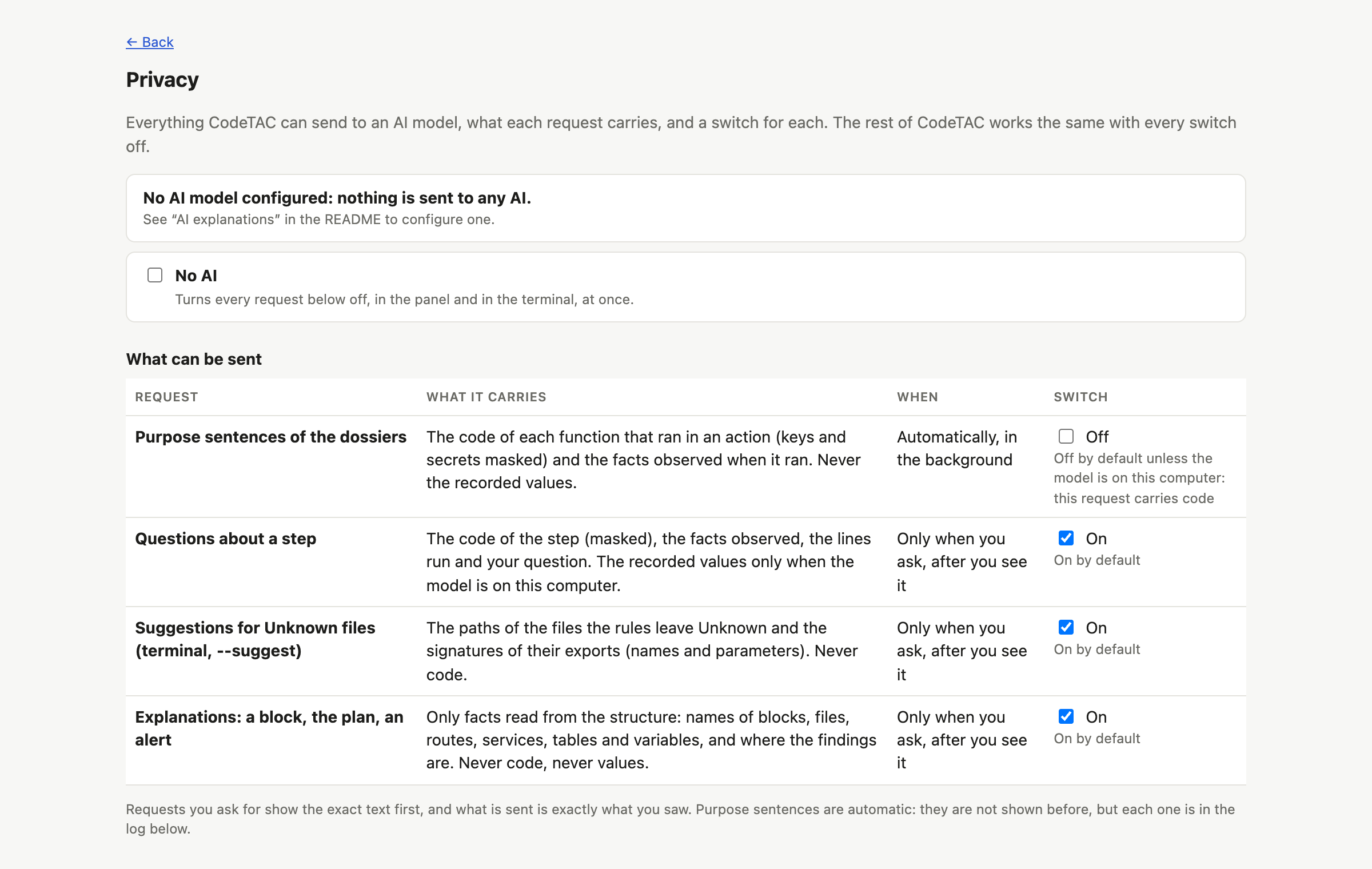
Open it with the Privacy link at the top of the panel and of Structure, or with codetac privacy in the Terminal. It lists every kind of request codeTAC can make to an AI, each with its own switch:
| Request | What it carries | When |
|---|---|---|
| Purpose sentences of the dossiers | the code of each function that ran (secrets masked) and the facts; never the recorded values | automatically — off by default with a model that is not on your computer |
| Questions about a step | the code of the step (masked), the facts, the lines that ran and your question; recorded values only with a model on your computer | when you ask, after you see the request |
| Suggestions for Unknown files | paths and export names, never code | codetac structure --suggest, after you see the request |
| Explanations (a block, the plan, an alert) | only facts read from the structure — names of blocks, files, routes, services, tables and variables — never code or values | when you ask, after you see the request |
| Interpretations of your prompts (What did my last prompt change?) | the text of a prompt you gave the coding assistant (secrets hidden), the paths of the project's files and the names of its blocks and services — never code | when you ask, after you see the request |
No AI turns them all off at once. Your choice is saved in ~/.codetac/privacy.json and counts straight away, in the panel and in the Terminal.
You see it before it is sent
Every request you ask for shows you exactly what would be sent, and only goes when you press Send. What is sent is exactly what you saw — an automatic test checks this for every kind.
Every request that is sent is written to a log on your computer (~/.codetac/ai-log.jsonl). The Privacy screen shows it and can clear it. In the Terminal: codetac privacy --log.
AI answers are checked
- In a dossier, a sentence from the AI that says something not observed is rejected (AI rejected) and replaced by the sentence built from the facts.
- In Structure, an explanation that names a file, route, table or anything else not in the facts is rejected. Answers are always marked as written by AI.
What it can't tell you
- The check is on names, not on reasoning: an AI can still draw a conclusion the facts do not support. Read AI answers as explanations, not as findings.
- The switches apply to the whole computer, not per project.
- Purpose sentences are not shown to you before they are sent (they are in the log).
- The log keeps up to 20 000 characters of each text.
- When you use a cloud model (Anthropic, OpenAI…), what you send is handled by that company's own privacy rules.